
Lead detective
Moneyman + Fintective for Israeli banks and cards.
Moneyman is an open-source scraper for Israeli banks and cards. Its WebPost storage can post straight to Fintective, so your transactions get the Detectors without a budgeting app.
What it is
A connection that receives rows posted by Moneyman's WebPost storage. You run Moneyman yourself. Fintective receives what it posts.
Who it's for
People with Israeli banks and cards who already run, or want to run, Moneyman.
How to connect
- Step 1
Create the connection
In Fintective, go to Settings, then Connectors, then Lead detective, and choose Moneyman.
- Step 2
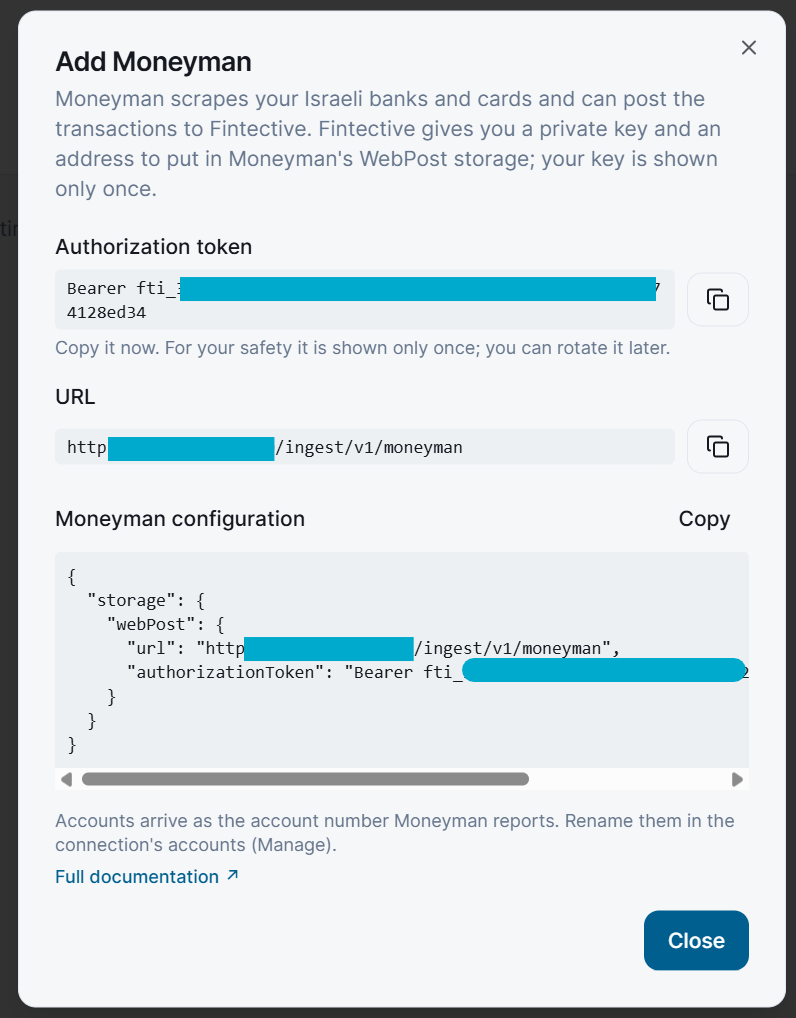
Copy your URL and authorization token
The URL is https://api.fintective.ai/ingest/v1/moneyman. The token is shown once.
- Step 3
Configure Moneyman's WebPost storage
Set the URL and key in your Moneyman setup. The in-app guide has the details.
- Step 4
Run Moneyman
Rows arrive in Fintective, up to 5,000 per post.
What Fintective reads
- Only the rows Moneyman posts
- Up to 5,000 rows per post
- The amount is in the row's chargedCurrency, ILS if none
What you control
- You run Moneyman, so you decide when it runs and which accounts it covers
- You can rotate the key at any time
- Each connection shows when and from which IP address its key was last used
- Disconnecting deletes the stored credential and keeps the imported history, unless you choose "Disconnect and delete data"
Security
- The key is stored only as a one-way hash, shown once, and rotatable.
- Fintective never sees your bank passwords. Those stay with your own Moneyman setup.
- Only the account owner can connect or disconnect a source.
- You are responsible for the accuracy of the data you send and for your right to share it.